Kanzi Studio marks invalid items in the Project and Library with red type.
For example:
- A node contains an invalid binding.
- A resource uses a resource that does not exist or is missing a required property.
- A material type has precision mismatches in its shaders.
You can find the invalid project items and the reasons they are invalid in these ways:
- Inspect invalid items in the Project or Library.
To see why a project item is invalid, hover over its name. The tooltip shows the reason the item is invalid.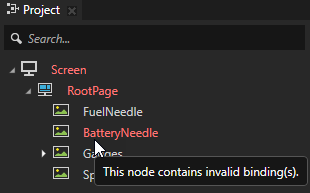
- Print invalid items to the Log.
To print to the Log window a list of all invalid items in your project and the reasons they are invalid, in Kanzi Studio in the main menu select > Log Invalid Project Items.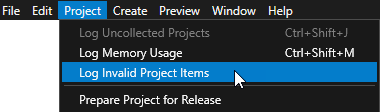
 TIP
TIPKanzi Studio prints the contents of the Log window also to the %USERPROFILE%\AppData\Local\Temp/KanziStudioLogs/KanziStudio.log file.
- Collect invalid project items using a script. See Logging invalid project items using a script.
See also
Logging invalid project items using a script
Analyzing your application in the Preview
